Buying guides
Single-needle vs multi-needle embroidery machine: which do you need?
Single-needle vs multi-needle embroidery machines compared on color changes, caps, free arm access, speed and footprint, with a clear rule for when to upgrade.
As an Amazon Associate I earn from qualifying purchases. It does not change the price you pay. How we handle links.
Our picks at a glance
Full pros, cons & specs for each ↓Quick answer
A single-needle machine stops at every color so you can re-thread; a multi-needle machine like Brother’s 6-needle PR680W holds several colors and changes between them on its own. For hobby use and testing a small business, single needle (such as the PE900) is enough. Move to multi-needle when color changes and volume, not design size, limit you. The PRS100 sits in between: single needle, but with a free arm and cap frame capability.
- Needle count controls color changes: single needle means you re-thread for every color.
- Brother lists the PR680W with six needles, automatic color changes and cap frame capability.
- The PRS100 Persona is single needle but adds a free arm, an 8 × 8 field and cap frame capability.
Jump to a section
Our shortlist
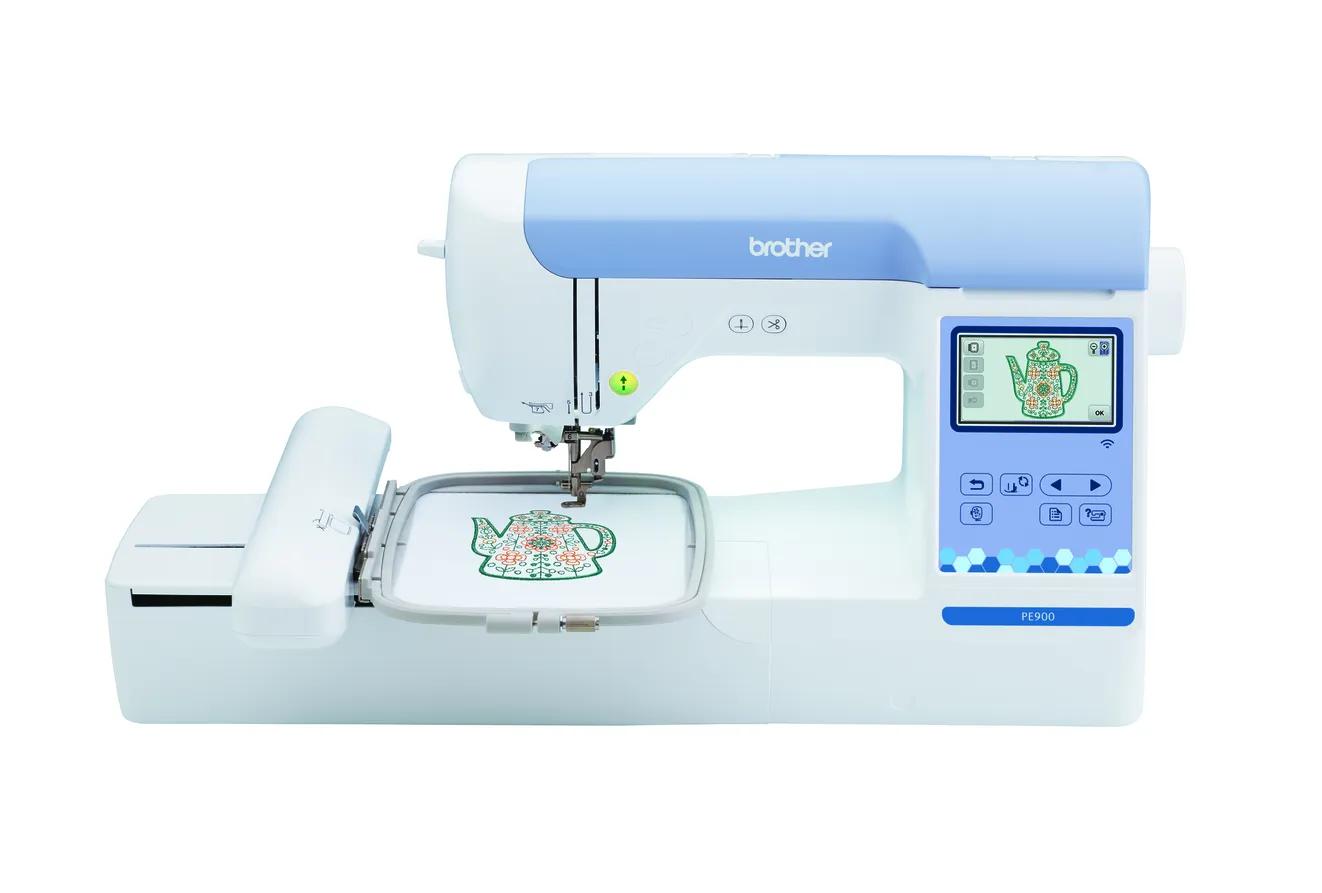
Brother PE900
Best for: Beginners who already sew (or do not need to) and want room for T-shirt fronts, totes and most popular design sizes.
- Field5 × 7 in (130 × 180 mm)
- TypeEmbroidery only
- Built-in designs193
- Max speed650 spm
- TransferUSB, Wi-Fi, Artspira app
Why pick it
- 5 × 7 field fits most popular design sizes
- Up to 650 spm
- Wireless transfer, Artspira and jump stitch trimming
Think twice if
- No sewing functions
- Single needle: you re-thread for every color
- Designs over 130 × 180 mm need splitting and re-hooping
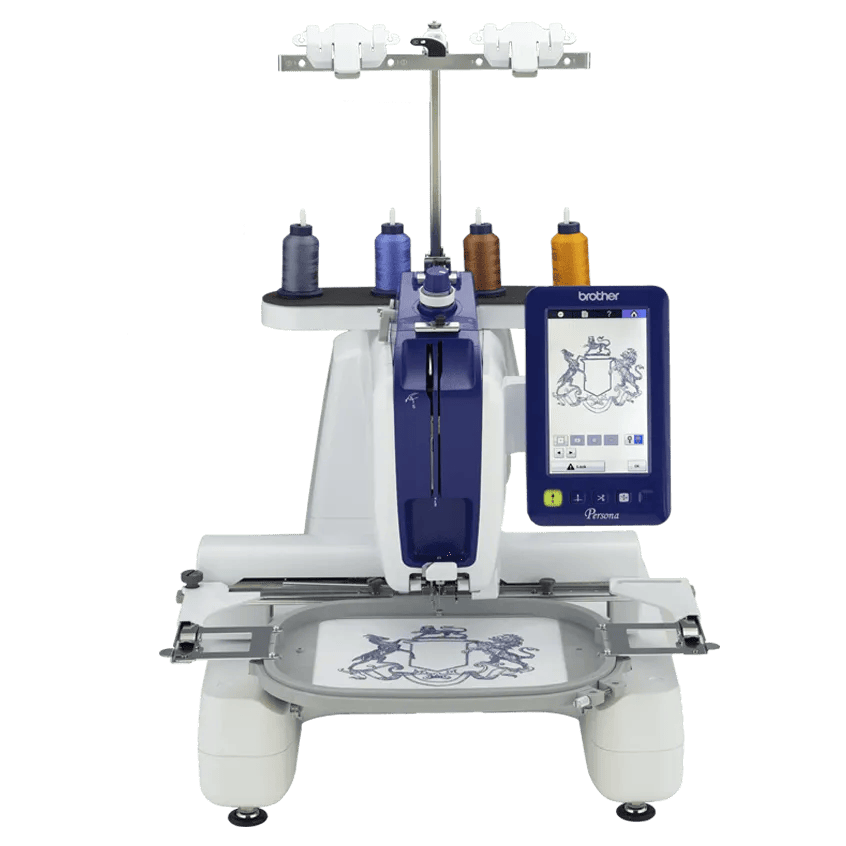
Brother PRS100 (Persona)
Best for: Hobbyists and small sellers who want hats, sleeves and bags on a single-needle machine with a free arm.
- Field8 × 8 in (200 × 200 mm)
- TypeEmbroidery only
- Built-in designs445
- Max speed1000 spm
- TransferUSB
Why pick it
- Cap frame capable with a free arm
- 8 × 8 field and up to 1,000 spm
- Six frames included
Think twice if
- Single needle despite the commercial styling
- USB only, no wireless listed
- Brother’s page lists both 445 and “over 405” designs
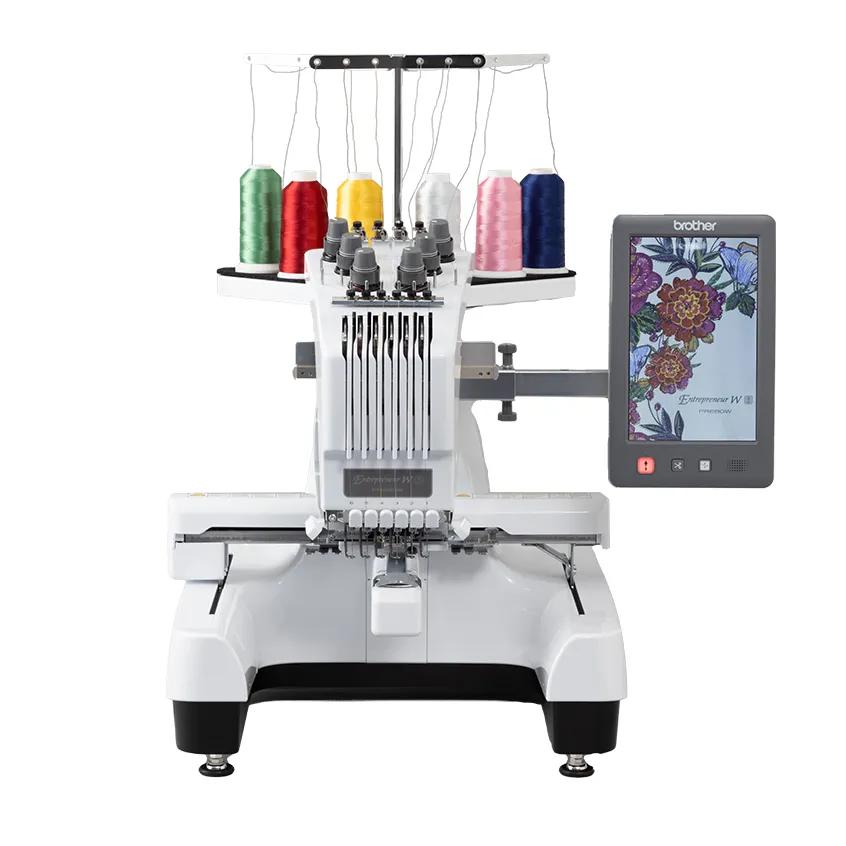
Brother PR680W
Best for: People starting an embroidery business who need hats, faster multi-color runs and less babysitting.
- Field8 × 12 in (200 × 300 mm)
- TypeEmbroidery only
- Built-in designs100
- Max speed1000 spm
- TransferUSB, Wi-Fi
Why pick it
- Six needles with automatic color changes
- Cap frame capable
- 8 × 12 field and up to 1,000 spm
Think twice if
- A big step up in cost and footprint
- More to learn than a home machine
- Overkill for occasional hobby use
“Single-needle” and “multi-needle” describe how many threaded needles a machine carries. Every home embroidery machine most beginners shortlist, from the PE545 to the NQ1700E, is single needle. Multi-needle machines, like Brother’s 6-needle PR680W, are the class most embroidery businesses grow into.
This guide compares the two on the things that change your day: color changes, what you can reach (caps, sleeves, bags), speed, size and when upgrading actually pays off. It uses Brother’s published specs for three representative machines.
What is the difference between single-needle and multi-needle?
| Single needle, flatbed | Single needle, free arm | Multi-needle | |
|---|---|---|---|
| Example | Brother PE900 | Brother PRS100 | Brother PR680W |
| Needles | 1 | 1 | 6 |
| Color changes | You re-thread for each color | You re-thread for each color | Automatic for up to six loaded colors |
| Max field (Brother) | 5 × 7 in | 8 × 8 in | 8 × 12 in |
| Max speed (Brother) | 650 spm | 1,000 spm (400–600 on caps) | 1,000 spm |
| Free arm | No | Yes, “caps, sleeves and bags” | Not described on Brother’s page |
| Cap frame capability | Not listed | Yes | Yes |
| Screen | 3.7” LCD | 7” LCD | 10.1” touchscreen |
| Transfer | USB, Wi-Fi, Artspira | USB | USB, Wi-Fi |
The middle column matters. People often assume the PRS100 is a multi-needle machine because of its commercial styling. Brother lists it as single needle.
How do color changes work on each?
Single needle. Brother’s PE900 manual describes it plainly: “Stitching stops automatically with reinforcement after one color has been completed. When automatic thread cutting is set, the thread is cut.” You then remove the first color, thread the next and press start, repeating for each remaining color. A design with eight colors means eight thread setups, and you need to be nearby for each. The PE900’s jump stitch trimming reduces hand trimming, but it doesn’t remove the color stops.
Multi-needle. Brother lists the PR680W with six needles threaded at once, and it switches between them automatically. Brother also lists speed and color-lock settings per needle. If a design has six or fewer colors, it can run start to finish without you re-threading. If it has more colors than needles, you re-thread for the extras.
That is the real productivity difference. On a two-color name, it barely matters. On a five-color logo stitched on 30 shirts, the single-needle machine needs 150 thread setups; the multi-needle needs five, once.
Which can embroider caps, sleeves and bags?
Flatbed machines move a hoop on a flat bed, which suits flat items. They struggle with tubes (sleeves, bag fronts sewn into a tube) and curved, stiff items like structured caps.
- PE900 and other flatbed home machines: Brother doesn’t list cap frame capability. You can do hat patches and soft caps floated on adhesive stabilizer, as OESD describes, but not structured caps on a cap frame.
- PRS100: Brother lists a free arm and cap frame capability. That is its main reason to exist.
- PR680W: Brother lists cap frame capability. Its included hoops are 1.5 × 2, 8 × 12, 5 × 7 and 4 × 4 inches, with no cap frame in that list, so budget for one. Brother’s page doesn’t describe tubular access in detail; ask the dealer which tubular frames fit.
Our best machine for hats guide covers cap options on each type.
Is multi-needle faster?
Top speed is part of it. Brother lists 650 spm on the PE900 and 1,000 spm on both the PRS100 and PR680W. But two things narrow that gap in practice:
- Machines rarely average their top speed, especially on small, detailed designs.
- Cap frames run slower. Brother lists 400 to 600 spm on cap frames for the PRS100 and PR1X.
The bigger saving is attendance. A single-needle machine needs you every few minutes on multi-color designs; a multi-needle machine can run a whole design while you hoop the next item. Estimate your own jobs with the stitch time calculator, which accounts for stitch count, speed efficiency, color changes and setup time. Our guide to how long machine embroidery takes explains each input.
What about size, cost and learning curve?
Multi-needle machines are a different class. Compared with a home machine, the PR680W is a big step up in cost and footprint, and it has more to learn: threading six needles, assigning colors to needles, and adjusting per-needle settings. Plan desk space and a sturdy table before you buy.
The PRS100 and the newer PR1X are a middle ground: commercial-style, single-needle machines with a free arm and cap capability, at less of a jump than a multi-needle machine. Brother lists the PR1X with an 8 × 12 field, 1,000 spm, a 7 inch LCD and no Wi-Fi.
Common mix-ups when comparing the two
A few misunderstandings come up again and again in machine listings and forum posts:
- “Six needles means six items at once.” No. The needles hold six thread colors for one design in one hoop. The machine still stitches one item at a time.
- “It looks commercial, so it must be multi-needle.” The PRS100 has the arm-style body of a commercial machine but, per Brother, a single needle. Read the needle count, not the photo.
- “Multi-needle machines don’t need re-threading.” They need threading once per color set, and again when a design calls for colors you haven’t loaded or has more colors than needles.
- “Higher top speed means proportionally faster jobs.” Hooping, trimming and color changes don’t speed up with a faster motor, and cap frames run slower than flat frames.
- “A bigger field needs a multi-needle machine.” Field size and needle count are separate. The NQ1700E is single needle with a 6 × 10 field.
Separating these helps you see what you are actually paying for: hands-off color changes and cap access, not a better stitch.
Does needle count affect stitch quality?
Not directly. A clean stitch-out depends mostly on the design file, stabilizer, hooping, needle and tension, whatever the needle count. Brother’s troubleshooting list for its home machines traces puckering, thread nests and breaks to things like threading mistakes, incorrect tension, a bent or dull needle and insufficient stabilizer, not to the type of machine.
What a multi-needle machine changes is consistency over long runs: fewer stops means fewer chances to re-thread incorrectly or misjudge tension on the fifth color of the twentieth shirt. A more capable machine won’t fix poor hooping. Our puckering guide and thread nest guide cover the common causes.
Who is each machine for?
Brother PE900 (single needle, flatbed)
Who it’s for: hobbyists and new sellers doing flat items such as shirts, towels, totes and quilt blocks, with designs up to 5 × 7. Brother lists Wi-Fi, Artspira and jump stitch trimming.
Skip it if: structured caps or repeat multi-color orders are the reason you are buying.
Brother PRS100 (single needle, free arm)
Who it’s for: people who want caps, sleeves and bags, with an 8 × 8 field and up to 1,000 spm, and who are fine re-threading for colors.
Skip it if: you mostly stitch flat items (a PE900 or NQ1700E does that for less), or you want Wi-Fi; Brother lists USB only.
Brother PR680W (6 needles)
Who it’s for: sellers running repeat orders, hats and multi-color logos, where hands-off runs matter. Brother lists an 8 × 12 field, Wi-Fi and a 10.1 inch touchscreen.
Skip it if: you haven’t yet confirmed steady demand. It is overkill for occasional hobby use.
Which should you choose?
- Choose a single-needle flatbed (PE900) if you embroider for yourself, family and occasional sales, mostly on flat items, and most designs have a handful of colors.
- Choose a single-needle free-arm machine (PRS100 or PR1X) if caps, sleeves and bags matter, but your volume doesn’t justify multi-needle and you’re fine re-threading.
- Choose multi-needle (PR680W) if you run repeat multi-color orders, take hat orders regularly, or your time at the machine is the bottleneck.
When is the right time to upgrade?
Upgrade to multi-needle when your own records show:
- Color changes, not stitching, are where your machine time goes.
- You regularly stitch the same multi-color design on many items.
- You turn down or outsource hat orders.
- You can’t leave the machine during runs because it keeps stopping for colors.
If your main frustration is design size instead, a larger single-needle field (NQ1700E at 6 × 10, PRS100 at 8 × 8) may solve it for less. Our small business machine guide works through the time math, and the pricing calculator helps check whether faster production would change your prices.
What do you give up with each type?
| Type | You gain | You give up |
|---|---|---|
| Single needle, flatbed | Lowest cost, compact, Wi-Fi on current Brother models | Caps, tubular access, automatic color changes |
| Single needle, free arm | Caps, sleeves and bags; bigger field; 1,000 spm | Automatic color changes; Wi-Fi on the PRS100 |
| Multi-needle | Automatic color changes, caps, 8 × 12 field | Low cost and small footprint; simpler learning curve |
If you’re still choosing a first machine, start with the beginner machine guide, or compare embroidery-only vs combo machines if you also sew.
Spec comparison
| Model | Field | Type | Designs | Max speed | Transfer | Shop |
|---|---|---|---|---|---|---|
| Brother PE900 | 5 × 7 in | Embroidery only | 193 | 650 spm | USB, Wi-Fi, Artspira app | Check price ↗ |
| Brother PRS100 (Persona) | 8 × 8 in | Embroidery only | 445 | 1000 spm | USB | Check price ↗ |
| Brother PR680W | 8 × 12 in | Embroidery only | 100 | 1000 spm | USB, Wi-Fi | Check price ↗ |
Frequently asked questions
Is a multi-needle embroidery machine faster?
Usually yes overall, but mostly because it changes colors on its own. Brother lists the PR680W at up to 1,000 spm versus 650 on the PE900, and the bigger saving on multi-color designs is not having to stop and re-thread.
Is the Brother PRS100 multi-needle?
No. Brother lists it as a single-needle machine. It looks more like a commercial machine and adds a free arm, cap frame capability, an 8 × 8 field and up to 1,000 spm.
Should a beginner buy a multi-needle machine?
Usually not as a hobby first machine. It costs much more, takes more space and has more to learn. It makes sense if you already know you will run repeat multi-color orders or hats.
Can a single-needle machine embroider hats?
Flatbed models like the PE900 don’t list cap frames, so structured caps aren’t realistic. Single-needle machines with a free arm and cap frame capability, such as the PRS100 and PR1X, can.
What happens if a design has more colors than needles?
The machine stitches the colors it has loaded and you re-thread a needle for the extra colors, so a six-needle machine still needs a stop on a seven-color design.
Sources & method
This guide is compiled from manufacturer documentation and specialist sources, not hands-on testing. We link every source so you can check it. Specifications change, so confirm details against your exact model manual. How we research.