Comparisons
NQ1700E vs Memory Craft 400E vs bernette 70 DECO: 6×10-class showdown
Brother NQ1700E vs Janome Memory Craft 400E vs bernette 70 DECO compared on field, speed, transfer and formats — which 6×10-class machine fits you?
As an Amazon Associate I earn from qualifying purchases. It does not change the price you pay. How we handle links.
Our picks at a glance
Full pros, cons & specs for each ↓Quick answer
The best 6×10-class embroidery machine for most beginners is the Brother NQ1700E: a 6 × 10 field, up to 850 spm, Wi-Fi and Artspira plus USB, with both 6 × 10 and 5 × 7 frames included. Choose the Janome Memory Craft 400E if you want the largest square field (7.9 × 7.9 in) and buy designs in JEF. Choose the bernette 70 DECO if broad file-format support matters most — it reads PES, DST, EXP, JEF, VP3 and more.
- All three are embroidery-only machines with fields well beyond 5 × 7.
- The NQ1700E is the only one with wireless transfer; the others are USB only.
- The Janome has the largest field but the fewest built-in fonts (6).
Jump to a section
Our shortlist
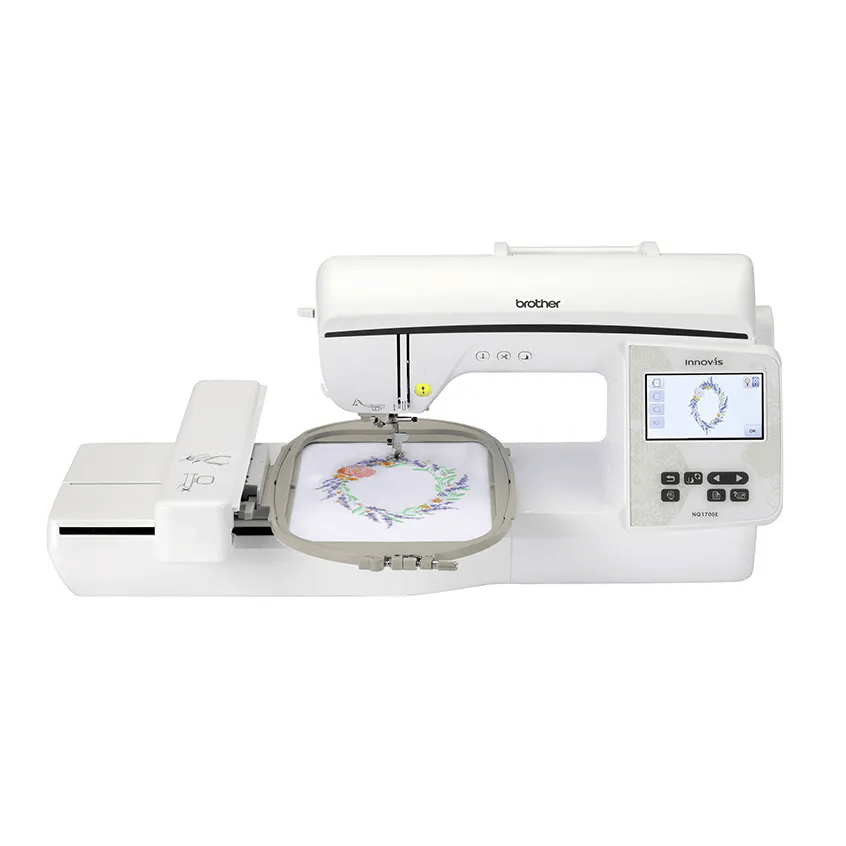
Brother NQ1700E
Best for: Beginners who already know they want bigger designs (jacket backs, larger quilt blocks) without re-hooping.
- Field6 × 10 in (160 × 260 mm)
- TypeEmbroidery only
- Built-in designs258
- Max speed850 spm
- TransferUSB, Wi-Fi, Artspira app
Why pick it
- 6 × 10 field: about 78% more area than 5 × 7
- Up to 850 spm
- Both 6 × 10 and 5 × 7 frames included
Think twice if
- No sewing functions
- More machine than many beginners need
- Still single needle
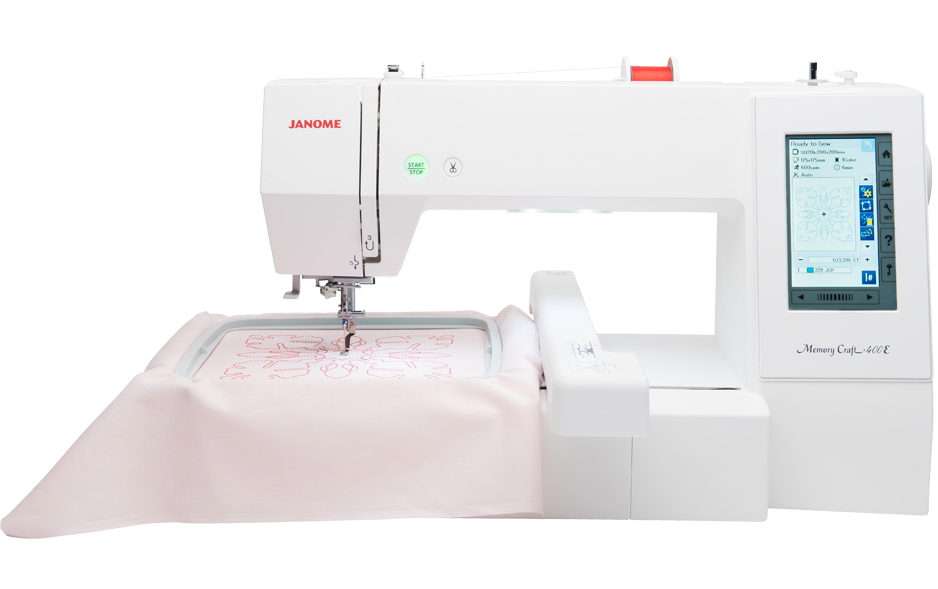
Janome Memory Craft 400E
Best for: Beginners who want a large square field and plan to grow into bigger designs, and are comfortable with USB.
- Field7.9 × 7.9 in (200 × 200 mm)
- TypeEmbroidery only
- Built-in designs160
- Max speed860 spm
- TransferUSB
Why pick it
- Large 200 × 200 mm field
- Up to 860 spm
- At least two hoops included
Think twice if
- USB only, no wireless
- Only 6 built-in fonts
- JEF format: buy or convert designs accordingly
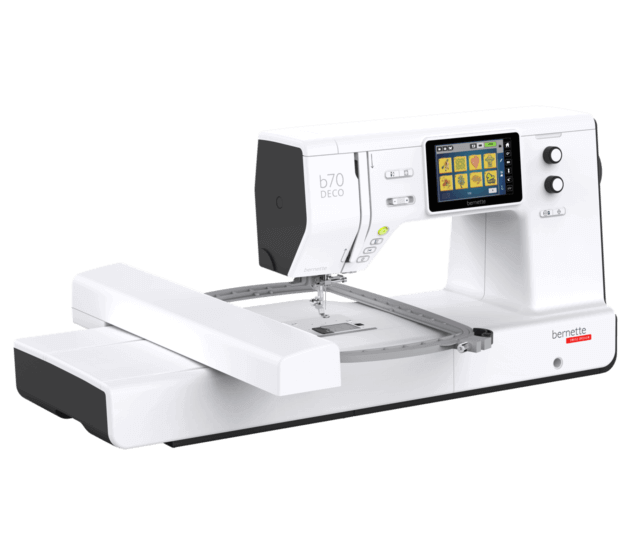
bernette 70 DECO
Best for: Beginners who want a large field and broad file-format support in an embroidery-only machine.
- Field6.3 × 10.2 in (160 × 260 mm)
- TypeEmbroidery only
- Built-in designs208
- Max speed850 spm
- TransferUSB
Why pick it
- Large 160 × 260 mm field
- Three hoops included
- Reads many formats, including PES and JEF
Think twice if
- No wireless transfer mentioned
- 7 built-in fonts
- Embroidery-only
A 6 × 10-class machine is the answer to one specific question: are your designs bigger than 5 × 7? If they are — jacket backs, large quilt blocks, statement tote designs — these three embroidery-only machines are the beginner-relevant shortlist. All sit a tier above the 5 × 7 machines in field size, speed and screen, and all cost meaningfully more than a PE900. Everything here comes from maker specs and manuals.
If you are not sure your designs need this much field, measure one and drop it into the hoop fit checker. Buying 6 × 10 for 5 × 7 designs is the most expensive version of buying too much machine.
How the three compare on maker specs
| Machine | Field | Built-in designs | Fonts | Max embroidery speed | Transfer |
|---|---|---|---|---|---|
| NQ1700E | 6 × 10 in | 258 | 13 | 850 spm | USB, Wi-Fi, Artspira |
| Memory Craft 400E | 7.9 × 7.9 in | 160 | 6 | 860 spm | USB |
| 70 DECO | 6.3 × 10.2 in | 208 | 7 | 850 spm | USB |
Speeds and design counts are per-maker figures; check current prices on each card above, because they change often.
A note on field shape: the Janome’s field is the largest overall but square (200 × 200 mm), while the Brother and bernette fields are wide rectangles (roughly 160 × 260 mm). Wide designs like jacket backs suit the rectangles; big square motifs suit the Janome. Our 4 × 4 vs 5 × 7 hoop guide explains how field shape constrains designs.
Which 6×10-class machine should you choose?
Use these rules before you read the details:
- Choose the NQ1700E if you want the easiest file transfer (Wi-Fi and Artspira plus USB), both 6 × 10 and 5 × 7 frames in the box, and the largest built-in design and font library of the three.
- Choose the Memory Craft 400E if your designs are big and square, you buy designs in JEF (or will convert), and USB transfer is fine.
- Choose the 70 DECO if you buy designs from many shops and want the fewest format headaches — its PES, DST, EXP, JEF and VP3 support covers nearly everything sellers offer.
- Choose none of them if your designs fit 5 × 7 — the PE900 covers that size for less.
Not sure which rule fits you? The machine finder asks about design size, sewing and transfer method and returns a short list.
Brother NQ1700E: the easiest to live with
Brother lists the NQ1700E as its current 6 × 10 embroidery-only machine: a 6 × 10 inch field (26 × 16 cm in the manual), 258 built-in designs, 13 lettering fonts, speeds up to 850 stitches per minute and a 4.85 inch touch screen.
Who it’s for: beginners who already know they want bigger designs and want the smoothest workflow getting files onto the machine — Wi-Fi and Artspira alongside USB, plus Brother’s PES format that most design shops sell natively.
Skip it if: your designs fit 5 × 7 (compare the PE900 and our PE900 vs NQ1700E comparison), or you need sewing in the same machine.
What you give up versus the others: the largest field (Janome’s square is bigger overall) and the broadest format support (bernette reads more formats). What you gain is wireless transfer and the biggest built-in library.
Janome Memory Craft 400E: the biggest field
Janome lists the Memory Craft 400E with a 7.9 × 7.9 inch (200 × 200 mm) maximum embroidery size — the largest field here — plus 160 built-in designs, 6 fonts and speeds up to 860 stitches per minute with USB transfer.
Who it’s for: stitchers whose designs are big and square, and who are comfortable with a USB-stick workflow and JEF files.
Skip it if: you want wireless transfer, lots of built-in lettering (6 fonts is the fewest here), or you buy PES designs and don’t want to convert them. Janome sells through dealers with no online price, so compare dealer support and warranty as well as price. Our Brother vs Janome overview covers the ecosystem differences.
Hoop note: Janome’s page lists the SQ20b (200 × 200 mm) and RE20b (140 × 200 mm) hoops, and in places also an SQ14b — confirm the included hoop set with your dealer before buying.
bernette 70 DECO: the format-friendly pick
The bernette 70 DECO is the embroidery-only machine from BERNINA’s bernette brand. bernette lists a 260 × 160 mm (10.2 × 6.3 inch) field, 208 designs, 7 fonts, up to 850 stitches per minute, a 5 inch color touch screen, and small, medium and large hoops included.
Who it’s for: beginners who buy designs from many different shops and want the fewest file-format problems. bernette’s brochure lists support for VP3, VIP, PEC, HUS, DST, EXP, JEF and PES — the broadest coverage of any machine here.
Skip it if: you want wireless transfer (bernette mentions none — plan on USB), or you need sewing in the same machine (the bernette 79 is the combo sibling with the same embroidery specs plus 500 stitches).
What about the step-down option?
All three machines only make sense if your designs exceed 5 × 7. If they don’t, the Brother PE900 is the rational buy: Brother lists the same 650 spm-class workflow with 193 designs, 13 fonts, Wi-Fi and jump stitch trimming in a 5 × 7 field — most popular design sizes, for less machine. Our PE900 vs NQ1700E comparison covers exactly where the step up pays off, and the beginner machine guide compares the 5 × 7 and 6 × 10 options side by side.
Screens, editing and day-to-day workflow
At this tier the on-screen experience diverges more than the spec table suggests. The NQ1700E’s 4.85 inch touch screen is the largest here, and Brother pairs it with on-screen editing (resize, rotate, combine designs) plus Artspira app support for sending designs from a phone. The bernette 70 DECO answers with a 5 inch color touch screen and notably broad file handling — buy a design in almost any common format and it loads. The Janome’s full-color touchscreen covers the essentials (layout, rotation, color sequencing) but the USB-only workflow means every transfer is a walk with a flash drive.
None of these machines digitizes for you: all three stitch out designs made elsewhere, whether built-in, bought, or drawn in software like Ink/Stitch. If you plan to create original designs rather than buy them, budget learning time alongside the machine — our digitizing guide and software guide cover the free starting points. And whichever transfer method you use, our design transfer guide walks through USB sticks, Wi-Fi and app workflows including the file-format conversions Janome owners need.
One practical workflow note: the NQ1700E ships with both 6 × 10 and 5 × 7 frames, so small designs stitch in the smaller hoop with less stabilizer waste and faster hooping. The bernette 70 DECO goes further with three hoops (small, medium, large) in the box. The Janome’s hoop set varies by dealer listing, so confirm exactly which hoops are included before comparing prices — a missing mid-size hoop is a hidden extra cost.
Price, dealers and warranty reality
None of these makers publishes a fixed street price, and all three move with sales — check current prices on the cards above rather than trusting any figure in a review. Two buying realities differ by brand:
- Brother (NQ1700E): widely sold online and in stores, so prices are comparable and stock is easy to find. Brother’s home-machine warranty applies to purchases from authorized resellers — the same end-use-purchaser terms our used machine checklist warns about, which also means used 6 × 10-class machines usually carry no maker warranty.
- Janome and bernette: sold substantially through dealers. That can mean better setup help, lessons and in-person service — and less room to price-shop online. Compare the dealer’s support (hoop set confirmation, setup lesson, service terms) alongside the price, since those extras are part of what you pay for.
Before buying any of the three, total the real startup cost — machine, stabilizer, thread, needles, software and a test-fabric allowance — with our startup budget calculator and the startup cost guide. A bigger field also means bigger stabilizer consumption per design, which shows up in the supplies math faster than beginners expect.
Who should not buy a 6×10-class machine?
Skip this tier if your projects fit 5 × 7, if you need sewing in the same machine (look at combos instead), or if you plan to sell embroidery regularly — at which point our small business machine guide explains when a multi-needle machine’s automatic color changes matter more than field size. For everyone else with genuinely big designs, pick by transfer method and file format: wireless PES (Brother), big-square JEF (Janome), or reads-everything (bernette).
Spec comparison
| Model | Field | Type | Designs | Max speed | Transfer | Shop |
|---|---|---|---|---|---|---|
| Brother NQ1700E | 6 × 10 in | Embroidery only | 258 | 850 spm | USB, Wi-Fi, Artspira app | Check price ↗ |
| Janome Memory Craft 400E | 7.9 × 7.9 in | Embroidery only | 160 | 860 spm | USB | Check price ↗ |
| bernette 70 DECO | 6.3 × 10.2 in | Embroidery only | 208 | 850 spm | USB | Check price ↗ |
Frequently asked questions
Which is better: the Brother NQ1700E or the Janome Memory Craft 400E?
For most beginners, the NQ1700E: Brother lists wireless transfer and Artspira alongside USB, up to 850 spm, and both 6 × 10 and 5 × 7 frames in the box. The Janome counters with a larger square field (200 × 200 mm) but USB-only transfer, 6 built-in fonts and JEF-format files. Pick the Janome if your designs are big and square; pick the Brother for easier file transfer.
Is the bernette 70 DECO good for beginners?
Yes, if your designs fit its strengths. bernette lists a 260 × 160 mm field, 208 designs, 7 fonts, three hoops included and unusually broad format support (PES, DST, EXP, JEF, VP3 and more per its brochure). The trade-offs are USB-only transfer and no sewing functions.
Do I need a 6 × 10 machine, or is 5 × 7 enough?
Most popular designs are sold in 5 × 7 and smaller, which the PE900 covers. You need 6 × 10-class only if your projects regularly exceed 5 × 7 in one hooping: jacket backs, large quilt blocks, big tote designs. Measure your designs with the hoop fit checker before paying for a bigger field.
What file format do these machines use?
Brother machines read PES natively; Janome reads JEF and JEF+; the bernette 70 DECO reads many formats including PES, DST, EXP, JEF and VP3. Always buy designs in your machine’s native format or convert them with software before transferring.
Sources & method
This guide is compiled from manufacturer documentation and specialist sources, not hands-on testing. We link every source so you can check it. Specifications change, so confirm details against your exact model manual. How we research.